Choosing secure cloud storage for business data starts with reviewing the type of information your company handles, identifying the rules it must follow, checking the provider’s encryption design, and matching the service to your daily work. Cloud storage is more than an online filing cabinet.
The right platform must combine strong zero-knowledge encryption, detailed user controls, dependable disaster recovery, and clear long-term costs. The aim is to let approved team members reach business files while keeping intellectual property and customer records safe from unauthorized access.
For small companies and growing teams, this task can seem difficult. Lean teams may begin by testing consumer plans or trying free cloud storage to learn how syncing and folder sharing work. Business-grade storage, however, calls for a more careful plan. Current threats include automated ransomware, stolen-password attacks, and advanced social engineering. Picking a cloud storage provider is both a security decision and a way to support daily business work.
A structured review can remove much of the guesswork and help you build a storage system that grows with the company. You may be moving old servers to the cloud or bringing scattered software tools into one system. This guide explains the main design requirements, security controls, and service measures that can help protect one of your company’s most valuable assets: its data.
What Is Secure Cloud Storage for Business Data?
Secure cloud storage for business data is a setup in which files, business databases, and other digital materials are kept on remote servers operated by a specialist provider. The service protects them with layers of physical security and encryption. Unlike personal file-sync tools made for quick photo transfers, business storage is built around legal requirements, reviewable access records, and detailed policy controls. It acts as a trusted source for company information while helping keep that information private, accurate, and available.
Behind a dependable business cloud service is a network of physical data centers, backup power systems, separated network areas, and strict identity controls. Security does not mean simply adding a password to a shared folder. It also involves separating each customer’s data, blocking unauthorized inspection by server administrators, and protecting information from people who might intercept network traffic.
How Cloud Storage Protects, Syncs, and Shares Business Files
Business cloud storage protects data in three states: while it moves, while it is stored, and while it is being used. When an employee uploads an executive spreadsheet or syncs a local folder, the service creates an encrypted connection with current protocols such as Transport Layer Security (TLS 1.3). This protects the connection from interception on public Wi-Fi, office networks, or compromised branch connections. After the data reaches the provider’s systems, it may be split into parts, encrypted with symmetric keys such as AES-256, and placed across several physical storage systems.
Sync tools keep files aligned across office computers, phones, tablets, and virtual desktop systems. Advanced business services use block-level delta syncing, which sends only the changed parts of an edited file instead of uploading the full file again. This lowers network use and limits the time during which changed data is exposed. For sharing, secure links can replace unencrypted email attachments. Administrators may add expiration dates, block downloads, require passwords, or use watermarks that connect a viewing session to a particular employee or outside account.
Cloud Storage, Cloud Backup, and File Sync Are Not the Same Thing
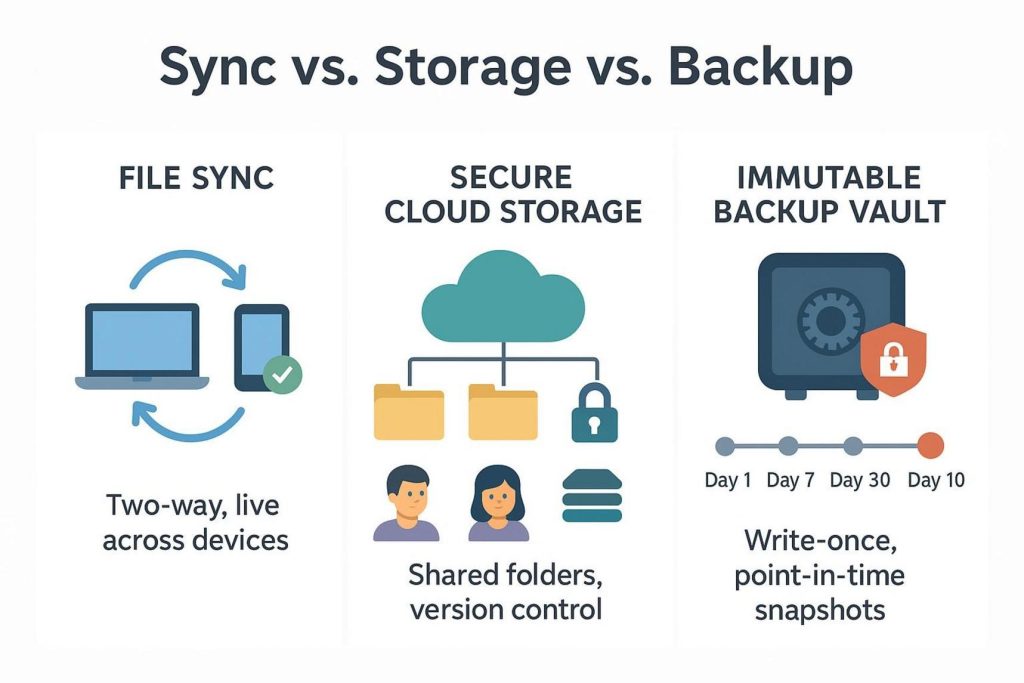
Business owners often treat file storage, automatic backups, and file synchronization as the same service. Marketing language can blur these differences, but each system has a different job.
File synchronization is a two-way mirror. If ransomware encrypts documents on an employee’s computer, or an approved user accidentally empties a folder, that change may be copied to the cloud right away and then spread to connected devices. File sync focuses on quick collaboration and access. It does not, by itself, protect files from unwanted changes.
Cloud backup works more like a historical, read-only record. It captures system states, databases, and folder structures at set times and stores them in separate, protected locations. Live users cannot freely edit or replace these copies. Cloud storage sits between these two uses. It offers the shared workspace and quick access of a sync service, while a secure setup can also include file versions, retention locks, and access restrictions commonly found in backup systems.
What Should You Assess Before Choosing a Provider?
Before contacting vendors or arranging product demonstrations, review your own business needs. Selecting a secure service without first checking internal requirements can lead to two problems: paying for a complicated system that employees avoid, or choosing a weak tool that leaves sensitive data at risk.
Each requirement you identify will affect the security rules, storage plan, and software connections you need from a cloud provider.
Identify the Data You Need To Store, Protect, and Classify
Business data does not all need the same level of protection. Treating every file in the same way can waste money and make daily work harder. Start with a data classification review. Group records by sensitivity and by the possible effect of unauthorized disclosure:
- Public: Marketing material, published white papers, and press releases that must remain accurate but do not need privacy.
- Internal: General staff messages, company calendars, and standard work templates.
- Confidential: Financial forecasts, source code, supplier agreements, and plans for future business activity.
- Restricted / Regulated: Personally Identifiable Information (PII), payment card details, protected health information, and trade secrets.
This data map helps you decide whether you need a zero-knowledge, end-to-end encrypted vault for highly restricted records or a more flexible shared workspace for everyday internal drafts.
Map Capacity, Users, Devices, Applications, Workflows, and Recovery Objectives
After listing the data you have, document how it moves through the company. Measure current use across local drives, older network-attached storage (NAS) devices, and existing SaaS services. Add an annual growth estimate of about 20% to 40% to allow for expansion. Also review activity by outside parties. Do auditors, subcontractors, or customers often send files to your company or download them from it?
List every type of device that connects to your storage system. A company with managed laptops and current operating systems has different needs from a distributed team that uses personal phones and tablets under a Bring Your Own Device (BYOD) policy. Review the main business applications as well. The storage service should connect safely with identity providers, enterprise resource planning (ERP) tools, and customer relationship management (CRM) systems without unsafe workarounds.
Set a Recovery Time Objective (RTO), which is the longest the company can operate without access to its storage system. Also set a Recovery Point Objective (RPO), which is the amount of recent work the company can afford to lose if data must be restored from an earlier copy. A design firm may accept a 24-hour RPO. A medical practice or financial brokerage may need near-real-time copies and almost no data loss.
Which Type of Cloud Storage Fits Your Business?
Cloud storage comes in several main forms. Choosing the wrong type can slow applications, increase costs, and make security rules harder to apply.
Many companies use a mix of storage types. Employees may need a simple file system for shared work, while applications and long-term archives may use programmable object storage.
File Storage for Documents and Team Collaboration
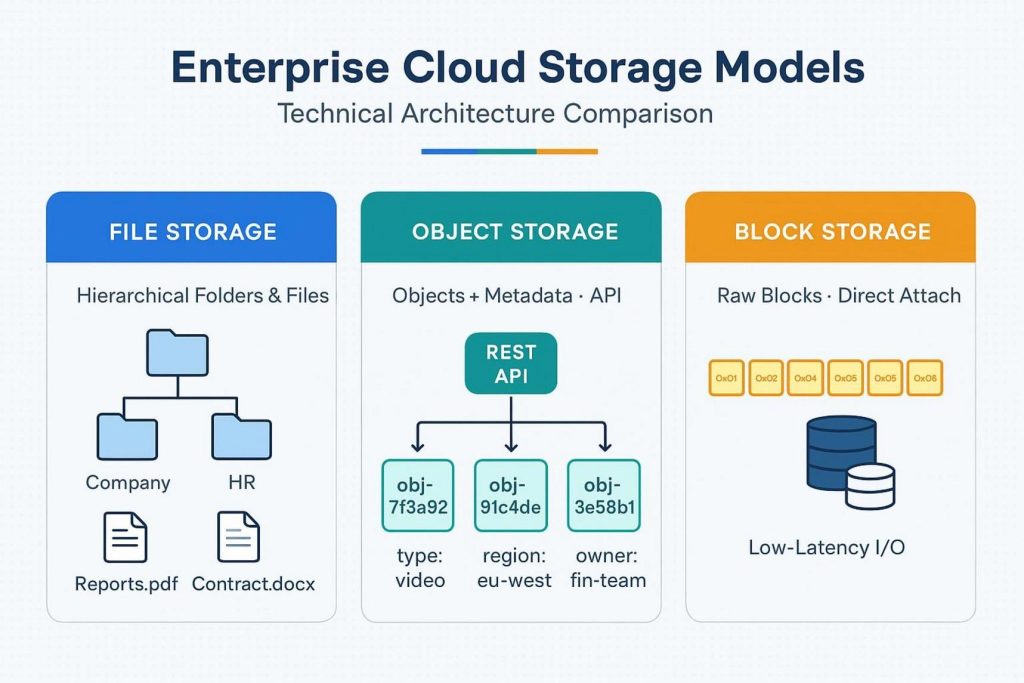
Cloud file storage arranges information in folders, subfolders, and files. It looks much like the shared network drives based on SMB or NFS that companies have used for years. This format is made for people and office productivity software.
File storage works well for office documents, shared spreadsheets, marketing material, and project folders. It can connect with operating systems through virtual drives, support simultaneous editing, and apply permissions through folder structures. It suits everyday work because employees can keep using a folder system they already know, which lowers training time and support work.
Object and Block Storage for Application Data, Archives, Databases, and Large Media Files
Large amounts of unstructured information, software build systems, and heavy database activity can exceed the practical limits of a regular file system. Object and block storage are better suited to these uses.
Object storage keeps information as separate units called objects in a flat address space rather than in nested folders. Each object contains the data, an identifier, and custom metadata. Services usually provide access through REST APIs such as the Amazon S3 API. Object storage can grow to very large sizes at a lower cost than many file systems. It is often used for backup archives, legal records, AI training data, and media collections that span many terabytes.
Block storage divides information into fixed-size storage blocks. A specialized operating system treats these blocks much like a hard drive. This format offers low delay, high IOPS (Input/Output Operations Per Second), and direct access for databases, virtual machines, and ERP applications. Office employees usually never work with block storage directly, but it supports many of the company’s most important applications.
Which Security Features Should Business Cloud Storage Include?
Security should be part of the main storage service, not an optional extra added later. Review each provider’s technical details and check that business-level controls are built into the platform rather than dependent on fragile third-party connections.
A proper security review covers encryption, controls that limit mistakes by administrators and users, and monitoring tools that can reveal suspicious activity.
Encryption, Multi-Factor Authentication, Single Sign-On, and Role-Based Access Controls
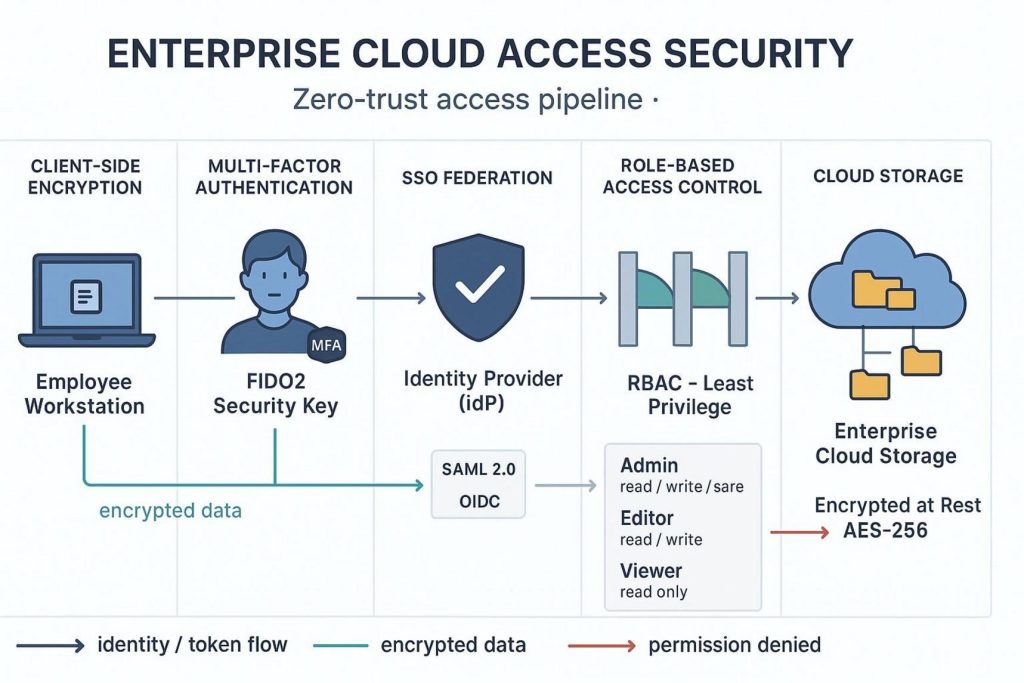
Encryption should cover the entire storage process. Look for AES-256 encryption for stored data and TLS 1.3 for data moving between devices and servers. For sensitive information, check whether the provider supports Customer-Managed Encryption Keys (CMEK) or zero-knowledge, end-to-end encryption. In a zero-knowledge design, your organization’s devices create and control the encryption keys. The provider holds only encrypted text and cannot read, analyze, or provide the plain files to another party.
Strong encryption needs equally strong identity checks. Multi-Factor Authentication (MFA) should be required for every account. The service should support hardware security keys such as FIDO2 or WebAuthn and authenticator apps, while avoiding less secure SMS codes. It should connect with your Identity and Access Management (IAM) system through Single Sign-On (SSO), using SAML 2.0 or OpenID Connect. SCIM (System for Cross-domain Identity Management) can automate the creation and removal of employee accounts.
Use Role-Based Access Control (RBAC) to manage permissions. Detailed RBAC rules support least privilege, meaning each person receives only the access needed for their job. A billing employee should not be able to read source code folders. An outside contractor should see only the folder needed for the contract, perhaps with view-only access and watermarked previews.
Version History, Retention Policies, File Recovery, Ransomware Detection, and Immutable Backups
Accidents and attacks can change or destroy data. A dependable business storage service should keep older file versions so users can restore earlier copies. Look for version records that remain available for at least 90 to 365 days without excessive extra charges.
Legal retention rules, often called Write Once, Read Many (WORM) storage or retention locks, are required in many regulated industries. These rules stop users, including global administrators, from changing or deleting selected records before the required period ends.
Current platforms should also detect unusual behavior and ransomware. If an account suddenly renames, encrypts, or deletes thousands of files within minutes, the service should be able to pause the session, alert security staff, and help administrators restore the full repository to a clean point in time.
Activity Monitoring, Audit Logs, Anomaly Alerts, and Independent Backup Protection
Clear records support accountability. Your storage service should create detailed, tamper-resistant audit logs for every major action. Each file view, download, permission change, shared-link creation, and failed login should include a time, source IP address, location data, and device details.
The service should let you export these records through APIs or Syslog connections to a central Security Information and Event Management (SIEM) or Security Orchestration, Automation, and Response (SOAR) system. This lets security staff compare storage activity with firewall and endpoint records. They can then spot warning signs such as logins from distant locations at the same time or large downloads late at night.
Do not depend on the main storage provider for every copy of your data. Follow the 3-2-1 backup method: keep at least three copies, use two different types of media, and place one copy in a separate cloud environment that is independent of the main provider.
How Do Compliance and Data Residency Affect Your Choice?
A cloud storage service may use advanced encryption and still create serious problems if it does not meet the rules for your industry. Breaking those rules can lead to large fines, loss of licenses, and a sharp drop in customer trust.
Following regulations affects the technical design of the service. It can determine where servers are located, how customer data is separated, and who may access the systems.
GDPR, HIPAA, Industry Regulations, Data Residency, and Security Certifications
Different regions and industries set specific rules for storing and sending business data:
| Regulation / Standard | Target Sector / Geography | Core Storage Mandates |
| GDPR | European Union / Global citizens | Right to erasure, strict rules for transfers across borders, local data storage requirements, and breach notices within 72 hours. |
| HIPAA / HITECH | United States Healthcare | A Business Associate Agreement (BAA), permanent audit records for electronic protected health information, access tracking, and strong encryption controls. |
| PCI-DSS 4.0 | Global Payment Processing | Separated networks, tokenized cardholder data, automatic access reviews, and no public exposure of storage buckets. |
| SOC 2 Type II | General Enterprise / SaaS | An independent review of security, processing integrity, confidentiality, and availability controls over a period of time. |
| ISO/IEC 27001 | Global Information Security | A formal system for managing risks involving data protection, facility security, and encryption practices. |
Data residency has become a major issue. Some countries require personal, financial, and healthcare records belonging to their citizens to stay inside national borders. Check whether the provider supports clear geographic controls. You may need to select a specific group of data centers, such as the European Union, Germany, the United States, or Switzerland, and block automatic copies in regions that do not meet your legal requirements.
What Performance and Reliability Standards Should You Compare?
Security that makes work too slow may lead employees to use faster, unapproved tools. Your storage service should work well during busy periods, support large file transfers, handle shared projects, and deal with sudden increases in traffic.
To review service reliability, look past advertising claims. Read the binding Service Level Agreement (SLA) and review the provider’s network and data center design.
Uptime, Service-Level Agreements, Performance, Scalability, Redundancy, and Data Portability
Read the provider’s SLA closely. A promise of “99% uptime” still allows more than seven hours of unplanned downtime each month. That amount may be unacceptable for many companies. Business systems should offer at least 99.9% uptime, which allows less than 44 minutes of downtime per month. Leading services may offer 99.99% or more, with clear service credits or other payments if they miss the target.
Review the provider’s physical backup design. Geo-Redundant Storage (GRS) and Zone-Redundant Storage (ZRS) copy information across separate availability zones or geographic areas. This can protect the business from local power failures, damaged fiber lines, floods, fires, and other regional events.
Test performance in conditions that resemble real work. High delay can cause CAD tools, accounting programs, and video editors to slow or pause. Check network round-trip time (RTT), IOPS, and sustained reading and writing speeds. Keep an exit plan as well. Confirm that the service offers open APIs, usable export tools, and practical ways to move data out. You should be able to retrieve the full company archive without being trapped in a proprietary file format.
Which Business Cloud Storage Platforms Should You Evaluate?
The business cloud storage market includes services built for different types of work. Some focus on close office-suite connections, while others focus on strong privacy and zero-knowledge storage.
Knowing the strengths of each group can help you compare your needs with the type of provider that fits them.
Microsoft Onedrive, SharePoint, Google Drive, Box, Dropbox, Privacy-Focused Platforms, and Cloud Object Storage
Microsoft OneDrive and SharePoint: These services suit companies that already use Microsoft 365. SharePoint acts as a content management and intranet system, while OneDrive handles each employee’s working files. The platform supports data loss prevention (DLP), Microsoft Entra ID connections, and conditional access rules. Its administration tools can be difficult, so the company may need trained IT staff to configure them safely.
Google Drive (Google Workspace): This option fits teams that place a high value on quick collaboration, live document editing, and cloud-based work. Google Workspace includes simple administration, strong search, and detailed access controls. Companies that require strict zero-knowledge encryption may need extra client-side encryption tools.
Box: Box focuses on corporate controls, regulatory needs, and business content management. It is widely used in finance, healthcare, and life sciences. Box Shield provides automatic file classification, behavior-based threat detection, and detailed audit search tools. This makes it a good option for organizations with strict risk controls.
Dropbox Business: Dropbox is known for simple desktop use and quick syncing. It has developed into a capable business service with central administration, electronic signatures, and team collaboration features. Creative agencies, architecture firms, and distributed teams often choose it because it is easy for staff to use.
Privacy-Focused and Zero-Knowledge Platforms: Services such as Proton Drive, Tresorit, and MEGA use privacy-first designs and often operate from jurisdictions such as Switzerland or countries in the European Union. They usually apply client-side end-to-end encryption by default. This means the provider and outside parties who intercept the data cannot read the stored business files.
Hyperscale Cloud Object Storage: Amazon S3, Google Cloud Storage, Microsoft Azure Blob, Wasabi, and Backblaze B2 serve developers, system architects, and infrastructure teams. They offer durable and cost-effective storage for application files, older backups, database snapshots, and large collections of unstructured data.
How Should You Compare Cloud Storage Costs?
Cloud storage prices can be hard to compare. A low per-user price may rise after you add data transfer, file retrieval, support, and other usage charges.
A sound financial review should calculate the total cost of ownership (TCO) across the full life of the data rather than focusing only on the advertised price.
Per-User, Capacity-Based, and Consumption Pricing, Including Transfer, Retrieval, Support, and Hidden Fees
Business cloud storage usually uses one of two main billing methods:
- Per-User (Seat-Based) Licensing: Common with services such as Microsoft 365, Google Workspace, and Box. The company pays a monthly or yearly fee for each account. The fee often includes a set amount of storage, such as 1TB to 5TB per user, or pooled storage under higher-level business plans.
- Capacity / Consumption-Based Pricing: Common with object storage and developer services such as AWS S3 and Azure Blob. The bill is based on the number of gigabytes stored each month. Prices are often divided into levels, with the price per gigabyte falling as the stored volume grows.
Extra operating charges often create the largest billing surprises. Many usage-based providers charge egress fees when data leaves their cloud and moves to the public internet or another provider. Also check API request fees for PUT, GET, and LIST actions. These costs can grow quickly when backup software repeatedly compares large numbers of files.
Review archive pricing as well. Moving older files to a cold tier such as S3 Glacier can lower monthly storage charges, but retrieving those files may cost more and may take several days. Enterprise support plans may also cost a percentage of your total monthly infrastructure bill instead of one fixed fee.
How Can You Test and Set Up a Cloud Storage Provider?
Do not sign a long business contract before testing the service in conditions close to real work. A planned pilot can reveal workflow problems, difficult administration, and syncing issues that sales materials do not show.
Use the pilot as a practical test of speed, ease of use, and the provider’s technical promises.
Confirm Documentation, Test Permissions and Performance, and Run a Pilot With Representative Users and Files
Start by reviewing the provider’s technical documents, API quality, and current compliance reports, including SOC 2 and ISO certifications. Create a test group that represents different parts of the company. Include an administrator, an executive with broad access, a field worker using cellular data, an outside collaborator, and an IT manager.
Upload files that look like your real business data. Include large media files, complicated folders with inherited permissions, and shared spreadsheets that several people edit. Test the permission system on purpose:
- Check that protected subfolders reject access attempts from test accounts without permission.
- Try to share files with outside users and confirm that domain allowlists, download blocks, and password rules work correctly.
- Measure sync speed, computer processor use, and local network traffic while several people save files at the same time.
Configure Regions, Least-Privilege Access, Multi-Factor Authentication, Secure Migration, Backups, and Recovery Testing
After choosing a provider, give security priority during the first setup. Select the geographic region where the data will be held. Turn off copies in multiple regions if they could break laws about international data transfers.
Connect the service to your company identity provider. Require hardware-supported MFA on every account and set reasonable session time limits for web access. Create groups based on job duties and give each group only the permissions it needs.
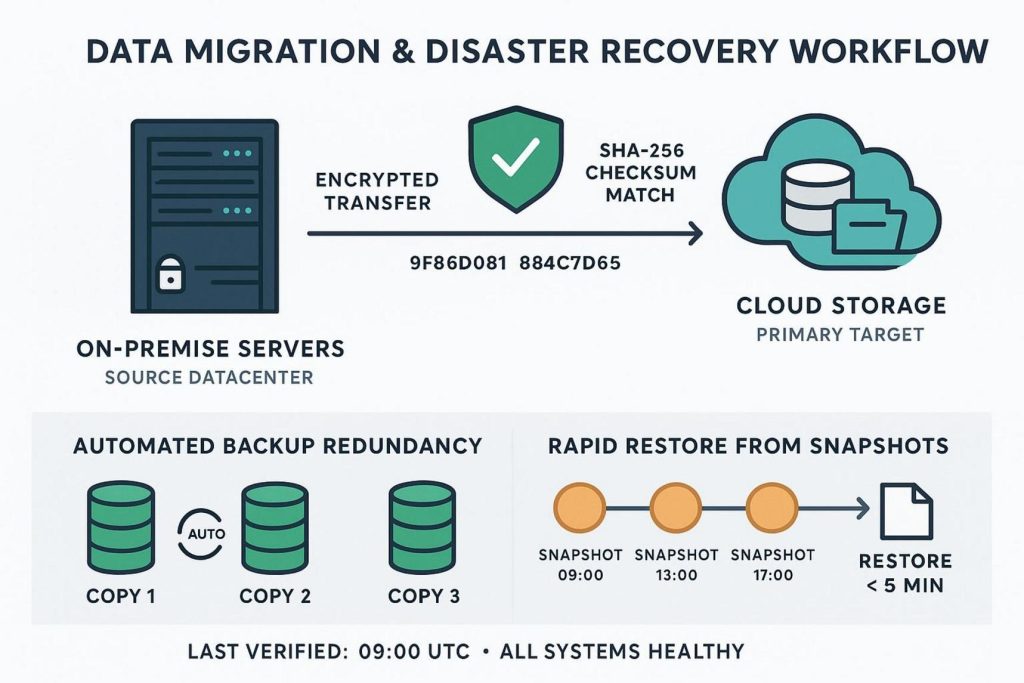
Move data in planned stages and check each stage before continuing. Begin with older archives and less sensitive material to test the network, folder layout, and file metadata. Move active business folders during a weekend or scheduled maintenance period. Use migration tools that calculate cryptographic checksums, such as SHA-256 hashes, before and after the move. This helps confirm that no files were damaged or changed. Finish by testing recovery. Simulate a large accidental deletion or local file damage and check that administrators can restore working files quickly.
What Practices Keep Business Cloud Storage Secure?
Cloud storage security is an ongoing responsibility, not a one-time project. It follows the shared responsibility model. The provider protects the physical servers, network equipment, and facilities. Your company remains responsible for user identities, local devices, file categories, permissions, and activity reviews.
Long-term protection depends on repeatable work habits that can respond to new attacks and changes inside the company.
Conduct Regular Access Reviews, Security Audits, Employee Training, and Activity Monitoring
Permission creep is a serious risk for businesses. Employees change jobs, join short-term projects, or leave the company, but their old access may remain active. Hold access reviews every three months. Department leaders should confirm which employees can use their team’s shared drives and remove access that is no longer needed.
Review outside-sharing links each month and remove public links that have not been used for more than 30 days. Set alerts for unusual bulk downloads and large-scale deletions. Technical controls work best when employees also receive regular training. Teach staff how phishing attacks can steal cloud session tokens, practice responses to social engineering through tabletop exercises, and show teams how to use approved encrypted links instead of personal email or consumer messaging apps.
Create and Test Incident Response, Disaster Recovery, File Restoration, and Business Continuity Procedures
During a security event, your team should not have to search through manuals. Whether the cause is a stolen login, a harmful employee action, or a new ransomware attack, the company needs a current Incident Response (IR) plan made for its cloud setup.
The plan should give clear steps for ending user sessions, separating infected devices, changing main encryption keys, and stopping tenant-wide syncing. Run disaster recovery exercises at least twice a year. Record how long it takes the IT team to restore a damaged folder with 50,000 files from a protected snapshot. Write down delays, update the response documents, and make sure recovery tasks do not depend on one person.
Match Security Controls to Data Sensitivity While Balancing Usability, Scalability, Performance, and Total Cost
A security system that makes ordinary work too difficult will eventually fail. If employees must complete several slow checks every time they open a simple internal agenda, they may send files to personal accounts or use unapproved messaging tools. That weakens the company’s security boundary.
Use controls that fit the sensitivity of the data. Customer databases, source code, and intellectual property may need strict conditional access, zero-knowledge encryption, and strong watermarking. General documents and team workspaces can use easier, context-based checks. This balance protects sensitive material without making employees less productive.
Companies should also prepare for changes in technology. Advances in quantum computing may eventually weaken some current public-key encryption methods. Post-quantum encryption may become an important part of long business contracts. Companies are already reviewing valuable archives for exposure to “harvest now, decrypt later” attacks, in which criminals collect encrypted information today and plan to decode it in the future. Political changes are also leading to more sovereign cloud services, where local staff and domestic rules control the infrastructure and help protect data from foreign legal demands.
By reviewing future encryption needs, applying firm data controls, and choosing a provider that fits your level of risk, your company can build a flexible and defensible digital foundation. This can help protect its most valuable information from current attacks and threats that may appear in the years ahead.