Highlights
- The Format Friction: How operational bottlenecks are caused by different file types (Word, Excel, PDF, HTML).
- Benefits of standardization: It includes increased cross-departmental cooperation, long-term archiving, and compliance.
- Automation ROI: Reducing manual conversion errors by utilizing Python-based technologies.
- Strategic Integration: The best methods for integrating Excel to HTML and HTML to PDF workflows into current ERP/CRM systems.
Data is essential to decision-making in today’s digital workplace, yet it is rarely available in a cohesive format. Businesses use a variety of document types across departments, from Word and PDF contracts handled by business and legal divisions to Excel spreadsheets used by finance teams. Although each format functions effectively when used independently, cross-departmental cooperation frequently reveals inefficiencies brought on by incompatible files and disjointed operations. This reality makes a cohesive enterprise document management strategy essential. In this piece, we look at how businesses can handle multi-format documents and transition to more organized, effective document management.
1. The Fundamental Formats: Comprehending the Enterprise Environment
We must first understand the distinct responsibilities that document formats play within the business hierarchy in order to handle documents properly. A certain phase of the data lifecycle is served by each format:
- Microsoft Word (.docx): The industry standard for writing, group editing, and creating policies is Microsoft Word (.docx). It is the incubation phase of a document.
- Microsoft Excel (.xlsx): It is used for data analysis, financial forecasting, and resource planning. It contains the core data logic that drives business decisions.
- PDF (Portable Document Format): The digital document is called a PDF (Portable Document Format). In order to ensure visual consistency across all platforms, it is the final format utilized for secure delivery.
- HTML/Web Content: The interface for the modern employee. It is how data is consumed via internal portals, intranets, and mobile dashboards.
2. The Operational Toll of Format Fragmentation
Why does having multiple formats in systems create such a significant challenge? In a fast-paced enterprise environment, the inability to transfer or move data seamlessly among these formats creates several hidden costs:

Workflow Bottlenecks
When a project manager has to manually copy data from an Excel sheet into a Word report and then manually “Save As” a PDF, the risk of human error increases rapidly. These manual interventions are the hindrance of document workflow automation. Every minute spent on formatting is a minute lost on high-value data analysis.
Version Control Chaos
Fragmented formats often lead to version chaos. A group may have “Report_Dashboard.html,” “Final_Report.docx,” and “Final_Report_V2.pdf.” Stakeholders will have to look at out-of-date data in the absence of an automatic synchronization plan, which could result in poor business decisions and even compliance issues.
3. The Imperative for Document Standardization
An essential component of a well-developed Enterprise Content Management (ECM) system is the adoption of a document standardization approach. Standardization isn’t about forcing everyone to use one tool; it’s about defining how information transitions between departments to maintain a trusted and clear data source.
A standardized strategy ensures:
Compliance and Audit Readiness: Complying with GDPR, HIPAA, or financial regulatory requirements requires keeping unchangeable documents.
Long-Term Preservation: Standardized formats guarantee that a document written today will still be usable in the future because they are made for reliable archiving.
System Interoperability: Standardized formats enable more effective metadata extraction by AI and RPA (Robotic Process Automation) tools, resulting in more intelligent business insights.
4. Increasing Productivity with Automated Conversion
The bridge between format diversity and standardization is file format conversion. For enterprises handling thousands of documents daily, manual conversion is not an efficient solution. Integrating automated libraries into the corporate tech stack allows for seamless transitions between the working phase and the sharing phase.
From Web Content to Archivable Records
Reports are produced as dynamic web pages in a lot of contemporary procedures. However, it is preferable to transform information into a static, secure format for internal sharing, archiving, or client distribution. Organizations can capture real-time web data and convert it into expert papers that maintain layout integrity by putting in place an automated HTML to PDF conversion procedure.
In reality, businesses frequently use specialized conversion engines like Spire.PDF to put HTML-to-PDF workflows into place. These technologies provide constant rendering, batch processing capabilities, and complete control over deployment environments because they are made for server-side automation.
From Data Analysis to Executive Visibility
Data in a spreadsheet is only useful if it is accessible. For internal reporting, the ability to convert Excel to HTML allows finance teams to push real-time snapshots directly to an executive dashboard. This facilitates quicker decision-making for all team members by allowing them to access real-time financial tables through their browsers without the need for specialized software.
5. Strategic Aspects of Enterprise Execution
Take into account the following recommended practices when including conversion and standardization technologies into your corporate architecture:
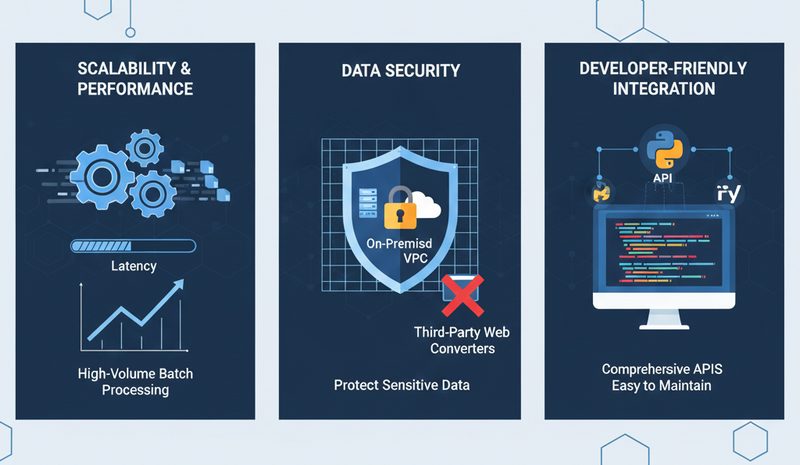
- Performance and Scalability: Select libraries that can manage large batch processing volumes. The system must handle hundreds of conversions at once without any lag in an enterprise setting.
- Data Security: Ensure that your conversion process happens on-premise or within a secure cloud VPC. Relying on external, third-party web converters poses a significant risk to intellectual property and sensitive client data.
- Developer-Friendly Integration: Select tools that offer comprehensive APIs for languages common in enterprise backends, such as Python. This guarantees that the system is simple to maintain and shortens the time-to-market for new internal features.
6. The ROI of Automated Document Management
Investing in automated format management brings back measurable business value. Beyond simply saving time, it reduces the total cost of ownership (TCO) of information. The organization obtains a level of operational flow that manual processes can never attain when documents flow automatically through their lifecycle, from an Excel data point to an archived PDF. This automation reduces labor costs, minimizes legal risks associated with document errors, and accelerates the overall pace of business.
Conclusion
The complexity of data only grows as businesses grow. A fragmented approach to file formats is a key barrier to growth and digital transformation. By embracing document standardization and leveraging high-performance automation tools, your organization can transform its document handling from a back-office chore into a streamlined strategic asset. Moving toward a structured, automated future ensures that your data remains accessible, compliant, and ready to drive your business forward.